

Download GanttPV – Simple, Free Gantt Chart Tool for Project Management
Overview – Why GanttPV Stands Out in the Crowded Project Management Landscape
Project managers constantly juggle timelines, resources, and team communication. While many enterprise‑grade solutions boast endless features, they can also add layers of complexity that slow down decision‑making. GanttPV cuts through the noise by delivering a lean, purpose‑built Gantt chart generator that focuses on the essentials: tasks, durations, dependencies, start dates, and holidays. The application is intentionally slim, targeting managers who need a quick visual plan without the overhead of contact lists, reminder alarms, or cloud‑based sharing. Because it concentrates on core scheduling, GanttPV remains fast, intuitive, and easy to learn—even for users who have never drawn a Gantt chart before.
At its heart, GanttPV transforms a spreadsheet‑style list of tasks into a printable Gantt chart that can be handed out in meetings or posted on a wall. The chart clearly shows critical paths, overlapping activities, and buffer periods, helping teams stay aligned on what needs to be done and when. While it lacks advanced resource‑allocation modules, its simplicity makes it a perfect fit for small‑to‑medium projects, internal initiatives, or educational settings where a lightweight planning tool is preferred over a heavyweight suite.
Security is baked into the download package – there are no hidden telemetry components, and the installer is signed, ensuring a safe installation on Windows or macOS machines. Updates are delivered as optional patches, keeping the core application stable while allowing users to adopt minor improvements at their own pace. In short, GanttPV offers a free, secure, and straightforward way to bring visual project planning to any team that values clarity over feature bloat.
Key Features – What You Get When You Download GanttPV
- Task Definition & Duration Input – Quickly add tasks, assign estimated hours or days, and set start dates with a clean form.
- Dependency Management – Link tasks using simple predecessor relationships, automatically adjusting start dates based on predecessor completion.
- Holiday & Non‑Working Day Calendar – Mark company holidays or custom non‑working days so the Gantt chart respects real‑world schedules.
- Automatic Gantt Chart Generation – One‑click conversion of your task list into a visual chart that can be printed or exported as PDF.
- Print‑Ready Layout – Optimized page setup ensures that the chart fits neatly on A4/Letter paper without manual scaling.
- Lightweight Installer – The download size is under 5 MB, making it quick to install even on slower connections.
- Cross‑Platform Support – Available for Windows 10/11 and macOS 10.13+; the same executable works on both platforms.
- No Internet Required After Install – All chart generation happens locally, preserving data confidentiality.
Beyond the core capabilities, GanttPV includes thoughtful touches that improve usability. The interface employs a clean, grid‑based layout that mirrors familiar spreadsheet tools, reducing the learning curve. Color‑coding options let you highlight critical tasks or differentiate phases. While the tool does not integrate with cloud services, you can manually copy the generated PDF to any sharing platform you prefer. Because the feature set stays focused, the application runs smoothly on older hardware, making it accessible to teams with limited IT resources.
In practice, these features combine to deliver a “set‑it‑and‑forget‑it” experience. Project leads can input their plan once, generate a polished chart, and then distribute the static PDF to stakeholders. The absence of ongoing sync requirements means there are no surprise version conflicts, and the simplicity encourages regular updates of the plan without fearing data loss.
Installation, Usage & Compatibility – Getting GanttPV Up and Running
Downloading GanttPV is straightforward. Visit the official website, click the “Download for Windows” or “Download for macOS” button, and save the installer (GanttPV‑Setup.exe or GanttPV‑Setup.dmg) to your computer. The installer is digitally signed, so both Windows Defender and macOS Gatekeeper will recognize it as safe. Follow the on‑screen prompts: accept the license agreement, choose an installation folder (the default works for most users), and click “Install.” The entire process takes less than two minutes on a typical broadband connection.
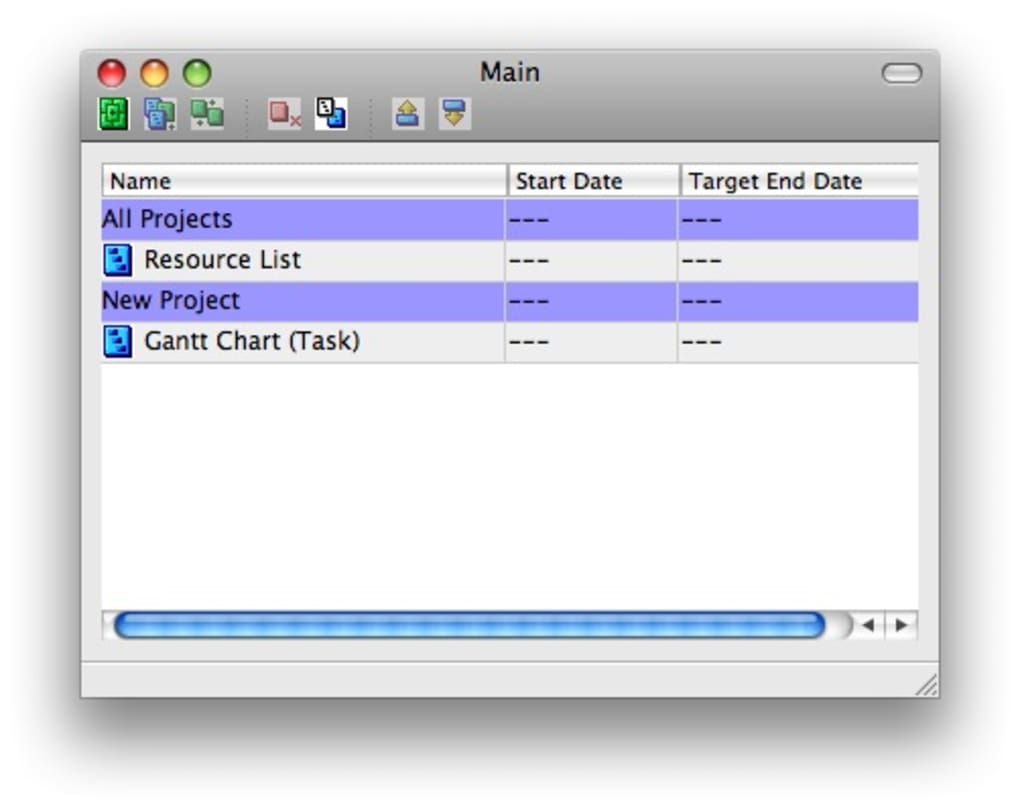
Once installed, launch GanttPV from the Start menu or Applications folder. The first screen presents a blank project grid. Begin by entering a task name in the first column, then specify the estimated duration, start date, and any predecessor tasks using the dropdown menus. For holidays, open the “Calendar Settings” tab, click “Add Holiday,” and select the date; the chart will automatically shift dependent tasks to respect those non‑working days.
After populating the task list, click the “Generate Chart” button. GanttPV instantly renders a Gantt chart in a preview pane. Use the zoom controls to adjust the timeline view, and apply color tags if you wish to differentiate milestones. When you’re satisfied, select “Export as PDF” to create a printable version. The PDF retains the exact layout, colors, and scaling you saw on screen, ensuring that the printed chart matches the digital preview.
GanttPV runs on Windows 10, Windows 11, and macOS 10.13 (High Sierra) or later. The application does not require .NET Framework or additional runtime libraries, as it bundles all necessary components. System requirements are modest: a 1 GHz processor, 512 MB RAM, and 100 MB of free disk space. Because the software processes data locally, there is no need for an internet connection after the initial download, which is ideal for secure environments or remote locations with limited connectivity.
For users who prefer a portable version, GanttPV offers a “zip‑portable” package that can be run from a USB stick without installation. This is especially handy for consultants who need to demonstrate project timelines on client machines without altering the host system.
Pros, Cons & Frequently Asked Questions – Real‑World Insights
Pros
- Extremely lightweight and fast – loads in seconds.
- Intuitive, spreadsheet‑like interface reduces training time.
- Free to download and use, with no hidden subscription fees.
- Offline operation guarantees data privacy.
- Print‑ready PDF output eliminates the need for third‑party converters.
Cons
- No cloud collaboration or real‑time sharing features.
- Lacks advanced resource allocation and cost tracking.
- No built‑in reminder or notification system.
- Only supports Windows and macOS; no native Linux or mobile apps.
- Cannot import/export directly from Microsoft Project or other PM tools.
Frequently Asked Questions
Is GanttPV really free or are there hidden costs?
GanttPV is completely free to download and use. There are no subscription tiers, no in‑app purchases, and no hidden fees. Optional updates are offered at no charge.
Can I import tasks from Excel or CSV files?
At present, GanttPV does not support direct import from Excel or CSV. Users must enter tasks manually, which ensures data integrity and simplicity.
Does GanttPV support multi‑project management?
The tool is designed for single‑project scenarios. To manage multiple projects, you need to open separate instances of GanttPV, each with its own task list.
Is there a way to customize the chart colors or fonts?
Yes. Within the chart preview, you can assign custom colors to individual tasks and choose between a limited set of fonts for the PDF export.
How does GanttPV handle project changes after the chart is generated?
Simply edit the task list, adjust durations or dependencies, and click “Generate Chart” again. The updated chart replaces the previous version without needing to recreate the entire project.
Conclusion – Should You Download GanttPV Today?
If your team needs a no‑frills, fast, and free way to visualise project timelines, GanttPV is an excellent choice. Its focus on core scheduling functions means you spend less time configuring software and more time guiding your team toward milestones. While power users may miss advanced resource management or cloud sync, the trade‑off is a lightweight tool that runs on virtually any modern PC or Mac without demanding bandwidth or costly licenses.
Ready to simplify your project planning? Download GanttPV now and start creating clear, printable Gantt charts in minutes. Experience the ease of a tool built for managers who value clarity over complexity.
GanttPV delivers exactly what its tagline promises: a simple, effective project management tool for small‑scale initiatives. Its free price point and offline operation make it a safe pick for organizations prioritizing data security. The lack of collaboration features may be a drawback for distributed teams, but for local or single‑point‑of‑contact projects, GanttPV shines.







